×
You can submit your article, report, announcement, ad etc. by mailing to editor@dandavats.com. Before subbmitting please read our posting guidelines here: http://www.dandavats.com/?page_id=39 and here: http://www.dandavats.com/?page_id=38

  • SUBMIT
  • Home
  • About Us
  • Archives
  • Guidelines
  • Log in

Share a single mouse and keyboard between multiple computers

by Administrator / 9 Aug 2007 / Published in Technical goodies  /  

By Citraka dasa

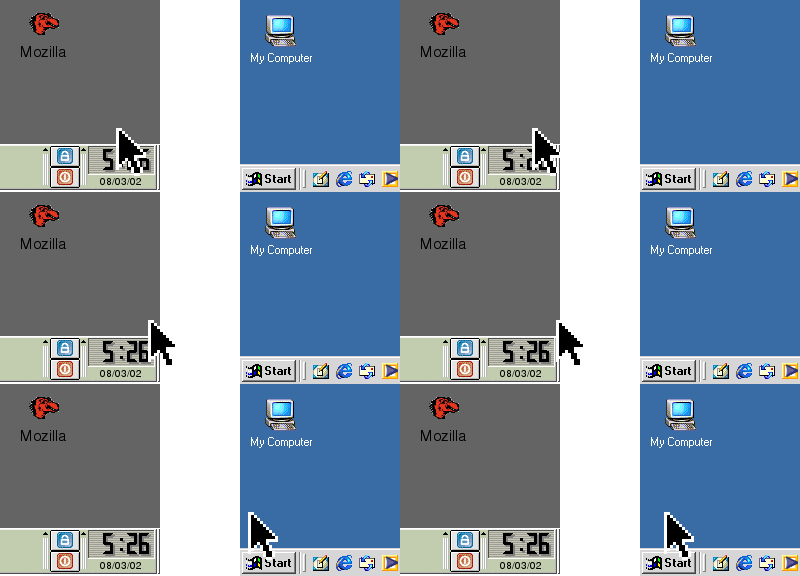
Synergy lets you easily share a single mouse and keyboard between multiple computers with different operating systems, each with its own display, without special hardware. It’s intended for users with multiple computers on their desk since each system uses its own monitor(s).

Redirecting the mouse and keyboard is as simple as moving the mouse off the edge of your screen. Synergy also merges the clipboards of all the systems into one, allowing cut-and-paste between systems. Furthermore, it synchronizes screen savers so they all start and stop together and, if screen locking is enabled, only one screen requires a password to unlock them all. Learn more about how it works and download it. It is free.

Migration to the Los Angeles Ratha Yatra
ANNUAL WORLD HOLY NAME DAY SEPTEMBER 17TH

About Administrator

What you can read next

How to receive Ekadasi alerts to your MSN/Skype/Gtalk and/or to your mobile phone
Nice Free Utilities for Windows
Wow, check this out! Krishna temple in panoramic

VIEW AS MAGAZINE

© 2015. All rights reserved. Buy Kallyas Theme.

TOP